What dispatch software does that a spreadsheet cannot
In short
Dispatch management software does one thing a spreadsheet cannot: it holds the current state of every job somewhere more than one person can read and change it at the same time. A spreadsheet is a snapshot of the morning. Dispatch is a stream.
- A spreadsheet plus a group chat works well while one person assigns all the work, the plan rarely changes after 8am, and nobody outside the team needs status.
- It stops working when a second person needs to write to it, not when you reach a particular headcount.
- The failure is not the spreadsheet. It is that real assignment state migrates into the dispatcher's head and the chat scroll, where nothing else can read it.
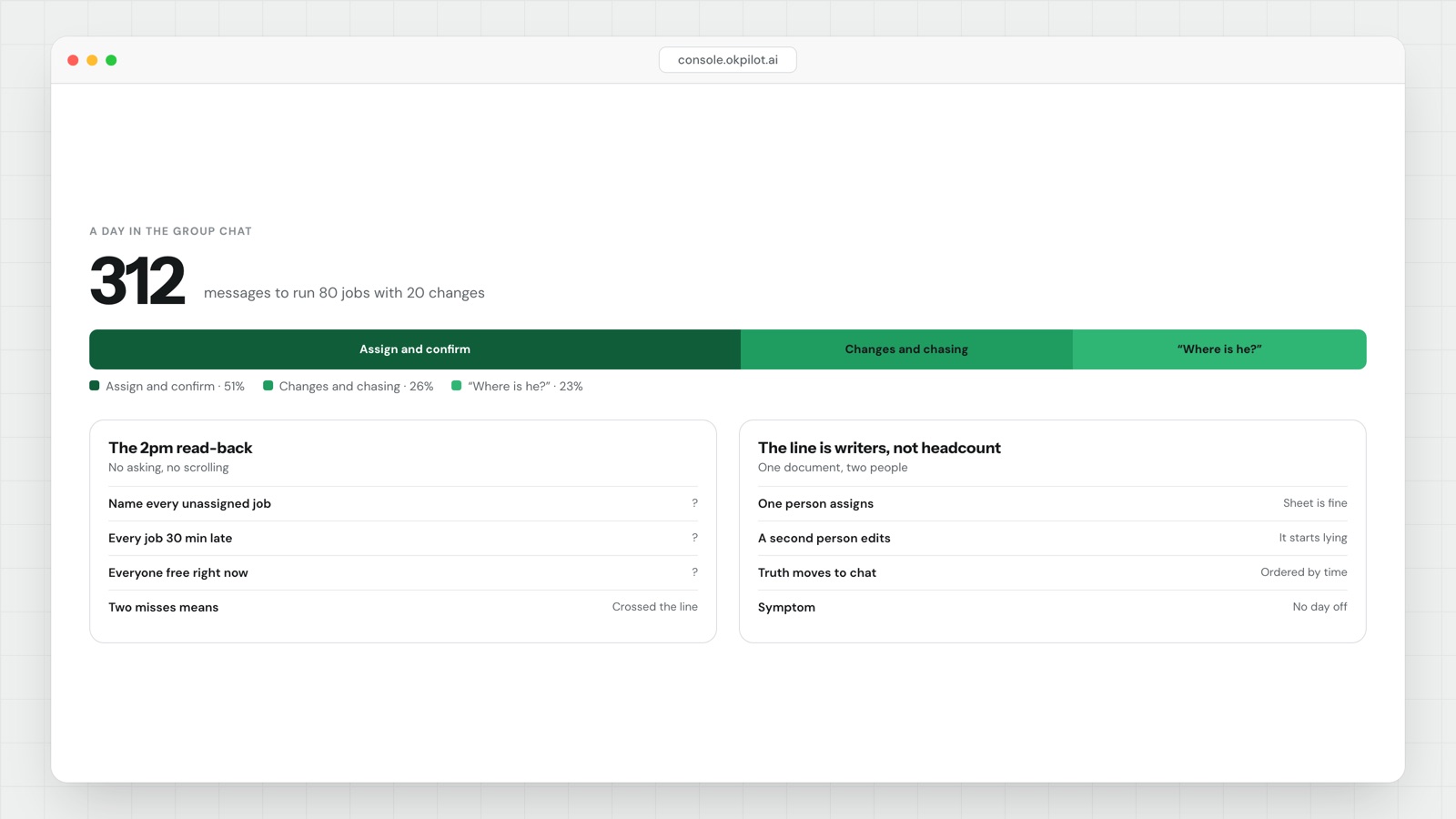
- The 2pm test: without asking anyone and without scrolling chat, name every unassigned job, every job running more than 30 minutes late, and everyone who is free right now. If you cannot, the state is in your head.
- The visible symptom is a dispatcher who cannot take a day off.
The line is about writers, not headcount
Most advice tells you that you outgrow a spreadsheet at some team size. Ten people, fifteen, twenty, depending on who is selling. That is the wrong variable.
A spreadsheet is a single-writer tool. One person can hold the whole plan in it accurately. The moment a second person needs to change the plan — a supervisor reassigns a job, a driver marks something done, an office colleague takes a reschedule call — you have two writers and one document, and the document starts lying.
Teams work around this instinctively. They stop editing the sheet during the day and start editing the chat instead. The sheet becomes the morning plan and the chat becomes the truth. That works, in the sense that the jobs get done. What it costs is that the truth is now a 400-message scroll that only one person can read at speed.
A spreadsheet can hold a plan. It cannot hold a state that two people change.
Why the chat scroll becomes the real system
Group chat is a good dispatch tool and a terrible record. It is a good tool because it is instant, everyone has it, and it handles the messy half of the job — "can you take a look, customer says the gate is locked" — that no structured field ever captures.
It is a terrible record for one reason: messages are ordered by time, not by job. To answer "what is happening with the Hargreaves job" you have to reconstruct it from four messages scattered across two hours and remember which of them was superseded.
You can do the arithmetic on your own volume rather than trusting anybody's benchmark. Count it for one day:
daily messages ≈ (jobs × 2)            assign + confirm done
               + (changes × 4)         reschedule, reassign, chase, confirm
               + (status questions × 2)
Forty jobs with six changes and ten "where is he" questions is about 124 messages. That is a readable day. Eighty jobs with twenty changes is closer to 300, and at that point nobody reads the scroll — they ask the dispatcher, which is exactly the bottleneck you were trying to avoid.
There is no credible public figure for how many jobs one person can hold in their head, and anyone who quotes you one has made it up. What you can measure is whether your own volume has already passed the point where people stop reading and start asking.
The 2pm test, and three others worth running
These take ten minutes and they are specific enough to settle an argument internally.
1. The 2pm read-back. Mid-afternoon, without asking anyone and without scrolling chat, write down: unassigned jobs, jobs more than 30 minutes late, people currently free. Then check each answer. Every wrong or missing item is state that exists only in somebody's memory.
2. The handover test. Have someone who is not the dispatcher run dispatch for two hours using only what is written down. Count the questions they have to ask. Under three, your plan is genuinely externalised. Over ten, the dispatcher is the system and the sheet is decoration.
3. The 4pm customer call. Someone rings asking when their job will happen. Time how long it takes to give a confident answer. If it is more than about 90 seconds, or if it requires calling the field worker first, you do not have status, you have an opinion.
4. The second-visit count. Over a week, count jobs that needed a repeat trip for a reason that was knowable in advance: wrong skill sent, part not on the van, access window missed. These are the jobs a spreadsheet cannot prevent, because the spreadsheet does not know who holds which certification or what is in which van.
Two or more failures across these four is a reasonable threshold for saying you have crossed the line. One failure usually means you have a specific gap, not a systemic one, and a software purchase will not be the cheapest fix.
What dispatch management software adds, concretely
Stripped of marketing, there are five things:
| Spreadsheet + chat | Dispatch system | |
|---|---|---|
| Who can change the plan | One person, reliably | Anyone with permission, at once |
| Current job state | In the dispatcher's head | In one record, visible to all |
| Who is free right now | Inferred from last message | Shown |
| Customer status | A phone call to the driver | A tracking link |
| Finished job | A message saying "done" | Photo, signature, time, location |
| Reassignment at 11am | Rebuild the plan manually | Change one field, everyone sees it |
The one that matters most is the last row. Scheduling is easy and every tool does it. Rescheduling is the actual job, and it is the part a spreadsheet makes expensive, because every change has to be re-broadcast by hand to everyone who is affected. We wrote about that distinction in more depth in route planner or dispatch software.
What it does not fix
Worth being straight about, because the pitch usually skips it.
Software will not fix a day where you have genuinely promised more work than you have hours for. It will only make the overbooking visible earlier, which is useful but is not the same as solving it.
It will not fix bad job data. If the address is wrong or the access code is out of date, a dispatch system sends the right person to the wrong door faster than a spreadsheet does. The fix for that is capturing the information on the first visit, which is a habit before it is a feature.
And if you are a team of three with predictable rounds and one dispatcher who is never off, a spreadsheet is the correct tool and you should keep it. The honest version of this argument is not that spreadsheets are bad. It is that they are single-writer, and your operation stopped being single-writer at some point you probably did not notice.
If you have crossed the line, the thing to look for is not more routing. It is a shared record of state — which is what delivery management software and field service management software are actually for, whatever else the demo shows you.
OkPilot is built around that record: you type what you want to happen, it dispatches and tracks, and the state lives in one place the office, the field worker and the customer can all see. The AI suggests the reassignment; a person approves it.
See OkPilot running your own operation
A live walkthrough with a real person, configured to your jobs on the call. About ten minutes. Setup takes around 48 hours.