What the customer actually wants from a tracking link
In short
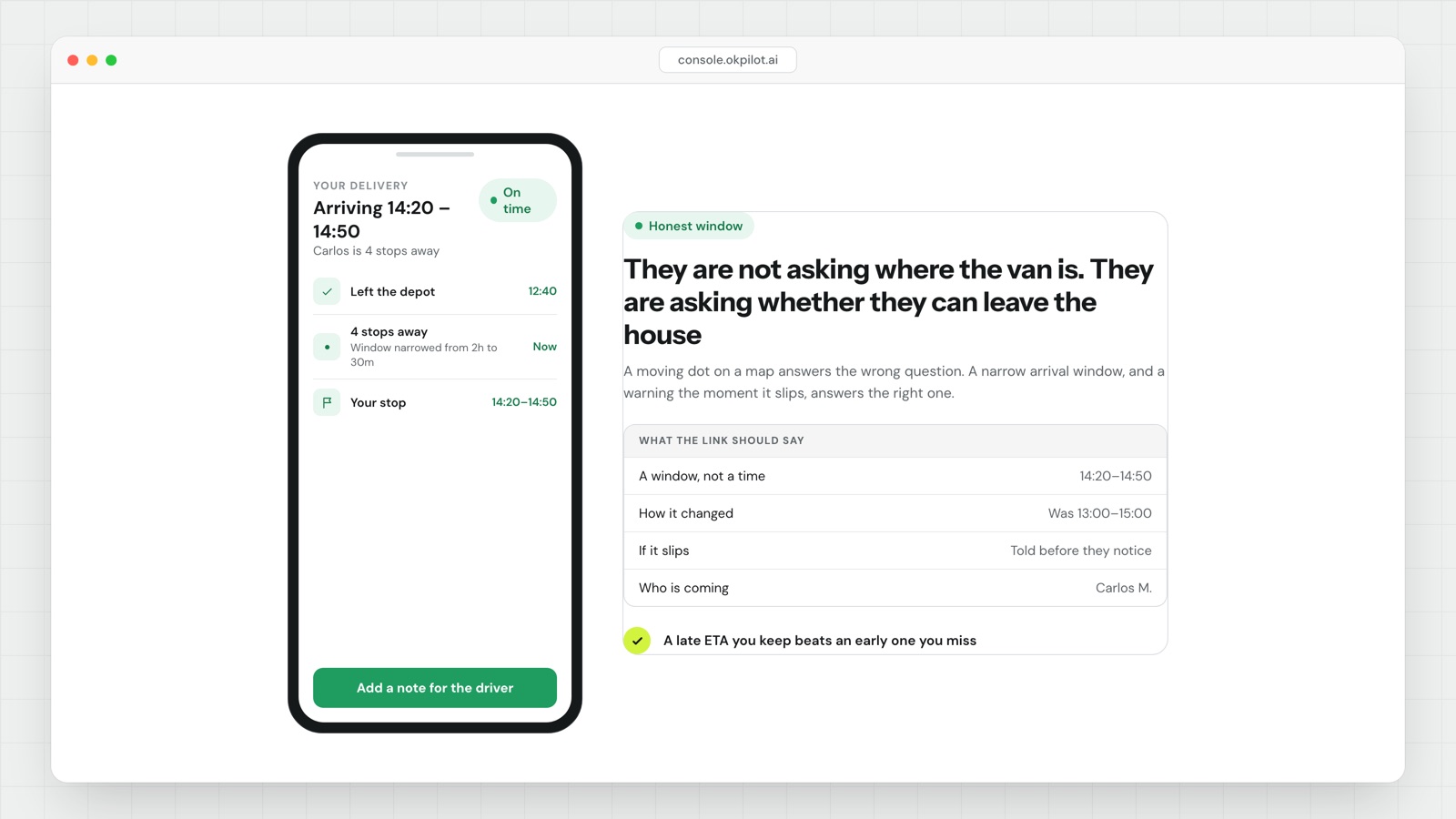
A tracking link's job is to answer one question: can I leave the house? That means a narrow, honest delivery window, a latest-by time rather than a best-guess time, and a notification the moment it slips. The map is decoration.
Set the window from your own data, not your hopes:
  error = actual arrival - predicted arrival
  window = predicted + p10(error) to predicted + p90(error)
On-window rate = arrivals inside promised window / total x 100- Promise the late edge. If your median arrival is 14:10 and your 90th percentile is 14:50, the window is "by 3pm", not "around 2:10".
- An early arrival against a stated window is a failure too. The customer was not back yet. Split your misses into early and late and count both.
- Notify when the new estimate leaves the promised window, or drifts by more than a third of the window's width, whichever happens first.
- Send one slip notification per leg unless there is a genuinely new reason. People stop reading the second one.
- "Three stops away" beats "2.4 miles away". A van two miles out with six stops in front of you is an hour away.
- A narrow window you cannot hit generates more calls than a wide window you can.
A "where is my driver" call is a "can I leave the house" call
Listen to the calls instead of counting them. Almost nobody is curious about the van. They are asking a scheduling question about their own day, and it takes one of about five forms:
- Can I go out for twenty minutes?
- Do I need to be here at all, or will you leave it?
- Should I tell the site crew to wait, or send them to the next job?
- It said 2pm and it is 3.15pm. Is this still happening today?
None of those are answered by a dot on a map. The customer looks at the dot, sees four miles, concludes fifteen minutes, goes to the shop and misses the delivery, because the four miles contained seven stops. Then they call, and they are annoyed, and it is your problem twice.
The map is not useless. It is reassurance that something is happening, which is worth something in the last ten minutes. It is just not information, and tracking pages lead with it because it is the easiest thing to build.
How to set a delivery window you can actually hit
Most delivery windows are set by someone deciding what sounds good. Two hours sounds tight and professional, so the page says two hours, and the operation hits it six times out of ten.
Set it from your own arrival data instead. The numbers are already in your dispatch records.
- For the last 200 completed jobs, compute
error = actual arrival - predicted arrival. Keep the sign. Early is negative. - Sort the errors and take the 10th and 90th percentile. With 200 jobs, that is the 20th and the 180th value.
- Your honest window is
predicted + p10topredicted + p90.
A worked example. Suppose the errors sort out so p10 is −8 minutes and p90 is +47 minutes. For a job predicted at 14:00 the honest window is 13:52 to 14:47. Round outward, not inward: call it 13:45 to 15:00.
That is a 75-minute window and you will hit it about eight times in ten by construction. If you want 60 minutes, you do not get there by printing a smaller number. You get there by shrinking the spread: better travel-time estimates, fewer open-ended jobs mid-route, or shorter routes.
Then track the result as a single number:
On-window rate = arrivals inside the promised window / total arrivals x 100Measure it weekly. A p10-to-p90 window is built to deliver 80%, so if you are running below that, something upstream has changed and the window no longer matches the operation. There is no published benchmark worth quoting here. The number that matters is whether yours is holding.
Promise the late edge, not the middle
Here is the part that feels wrong and is right. When you give a customer a single time, give them the time by which it will definitely have arrived, not the time it will probably arrive.
The asymmetry is in the customer's cost, not yours. If you say 2pm and arrive at 2.40pm, they waited forty minutes for you and spent some of it wondering whether to call. If you say "by 3pm" and arrive at 2.40pm, you were early and they were pleased. Same van, same minute, two different experiences.
This also fixes the early-arrival problem, which most teams do not count as a problem at all. A driver who shows up at 1.20pm against a 2pm to 4pm window finds nobody home. That is a failed delivery, a redelivery cost and a complaint, and it will be logged as "customer not available" in your proof of delivery rather than as a window miss. Count early arrivals against your on-window rate or you will never see them.
The customer is not optimizing for speed. They are optimizing for not having to wait.
The exception is a short tail. If you are twelve minutes out, say twelve minutes, because the customer's decision horizon is now and precision is cheap. The further out you are, the more the number should lean late.
Tell them when it slips, and tell them once
A window is a promise with a duration. The moment you know you will miss it, the promise needs replacing, and that is the highest-value message on the whole page. Two rules keep it useful.
Trigger rule. Notify when the recalculated arrival moves outside the promised window, or when it drifts by more than a third of the window's width, whichever comes first. On a 90-minute window that second trigger is 30 minutes of drift. It catches the case where you are technically still inside the window but visibly heading out of it.
Frequency rule. One slip notification per leg unless something genuinely new happens, like a breakdown or the job moving to tomorrow. A page that pushes a revised estimate every nine minutes trains people to ignore it, and then your one important message does not land either.
The message needs a new latest-by time and, if you have it, a one-line reason. "Running late, now arriving by 4.30pm" is adequate. "Running late, now arriving by 4.30pm, the stop before yours took longer than expected" is better, because it reads as a person rather than a system and tells the customer this is a one-off. What does not help is a reason with no new time attached. "We are experiencing delays" answers nothing and generates the call you were trying to prevent.
What belongs on the page, in order
If you are rebuilding a tracking page, this is the priority order, top to bottom:
| Priority | Element | Answers |
|---|---|---|
| 1 | Latest arrival time, large | Can I leave the house |
| 2 | Stops remaining before yours | Is the dot lying to me |
| 3 | Whether anyone needs to be present | Do I have to be here |
| 4 | Slip notice, if the window moved | Has the plan changed |
| 5 | Driver first name, vehicle | Who am I opening the door to |
| 6 | A way to add access instructions | The gate code, the back entrance |
| 7 | The map | Reassurance in the last ten minutes |
Row six earns its place twice. A customer who types "gate code 4417, leave with the concierge if I am out" while looking at the page has just removed a failed delivery, and they will do it, because at that moment they are the most motivated person in the chain. Collecting access detail at the moment of attention rather than at order time is the cheapest fix most operations have available, and it is a variation on the point that the hard part is getting inside, not getting there.
None of this makes the van faster. A tracking link does not improve your routes, and a narrow window you miss is worse than a wide one you keep. What it changes is how many people have to call to find out what is happening, and what they think of you afterwards when the delivery was late anyway.
OkPilot's tracking link carries a window and a slip notice rather than only a position, and the access notes customers add on it go back to the driver's job rather than into an inbox.
See OkPilot running your own operation
A live walkthrough with a real person, configured to your jobs on the call. About ten minutes. Setup takes around 48 hours.