Dynamic route optimization: replanning after the day has started
In short
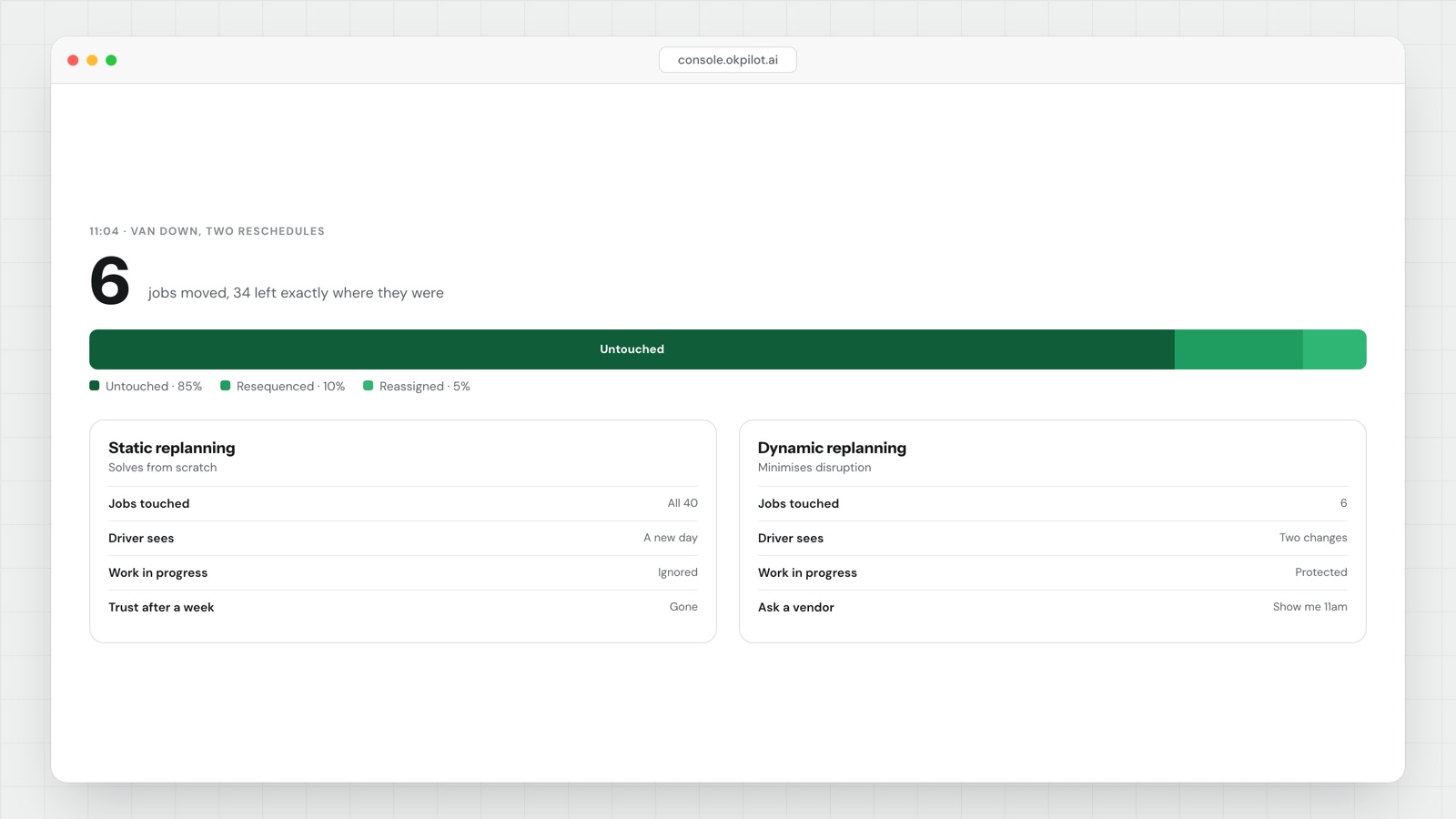
Dynamic route optimization means recalculating routes while the shift is running — after a new order lands, a stop fails, or a driver falls behind — instead of solving once before the first van leaves. The hard part is not re-solving. It is re-solving without churning work already in progress.
Route churn = stops resequenced ÷ stops remaining at the moment of replan| Static planning | Dynamic replanning | |
|---|---|---|
| Runs | Once, before dispatch | On a trigger, mid-shift |
| Inputs | The day's confirmed orders | Live positions, completions, new orders, delays |
| Objective | Shortest total distance and time | The same, minus the cost of changing a plan already in motion |
| Fails when | Reality moves at 11am | It re-solves too freely and drivers stop trusting it |
- A naive dynamic planner re-solves from scratch and hands the driver a different sequence. It is shorter on paper and worse in the van.
- Good replanning freezes a commit horizon, inserts new work rather than resequencing old work, and prices disruption into the objective.
- Every replan that moves a committed stop creates a second job: telling that customer their ETA changed.
- There is no credible published benchmark for acceptable route churn. Measure your own for two weeks, then set your own ceiling.
Static planning solves the morning. Dynamic route optimization solves 11am.
At 06:30 you have a clean problem. A fixed list of orders, known windows, known vehicles, nobody has moved yet. A static optimizer handles this well and has done for twenty years. You should not pay a premium for it.
By 11am the problem is different in kind, not degree. Four stops are done. One failed because nobody was home. Two same-day orders came in. Driver 3 is forty minutes behind a blocked delivery bay. Driver 5 texted to say she is going home sick after her next stop.
A static plan has nothing to say about any of that, so someone in the office starts moving jobs by hand — fine for ten stops, hopeless for two hundred. Dynamic route optimization automates that 11am decision. Whether a product actually does it, or just re-runs the morning solver on what is left, is the only question worth asking.
Why re-solving from scratch makes drivers hate the system
Picture a driver with 22 stops remaining. The van was loaded in route sequence, parcels stacked so the next one is nearest the door. He has told two customers roughly when he expects to arrive, because they asked.
The optimizer re-solves. The new sequence is six minutes shorter.
Those six minutes are gone before the third stop, because he is now digging through the van at every door. By the fourth change of the day he has stopped reading the app and is working from the list he wrote on paper at eight o'clock. At that point you have bought an expensive route planner and are running a manual operation.
Three failure modes, all common:
- Load order breaks. If the van is loaded in sequence, resequencing has a real cost the optimizer cannot see unless you tell it about load order.
- The dispatcher loses the plan. If the route changes every twenty minutes, nobody can answer "where will driver 4 be at two o'clock", and that question is most of a dispatcher's day.
- Flip-flopping. When two drivers are nearly equidistant from a stop, successive replans bounce it between them. The solver is close to indifferent; the drivers are not.
None of this argues against dynamic replanning. It argues that the objective function needs more in it than distance.
What good replanning actually constrains
These are the mechanisms that separate a replanner you can leave on from one you switch off by the second week.
A commit horizon. The next N stops, or the next X minutes, are frozen. Nothing the system does will touch them. This is the most important setting, and you should be able to change it — a pharmacy round with narrow windows wants a long freeze, an on-demand courier operation a short one.
Insertion rather than resequencing. When a new job arrives, the question is "where is the cheapest feasible place to put this", not "what is the best route for all remaining work". Insertion changes one position. Re-solving changes all of them.
Disruption priced into the objective. An explicit penalty per stop whose position changes, and a bigger one per customer whose promised window changes. Without it, the solver treats a plan nobody has seen and a plan a driver has memorized as equally free to discard.
Hysteresis. Require the improvement to beat a threshold, not merely to be positive. A starting rule, to be tuned against your own data:
Accept the replan only if:
  projected minutes saved  >  3 × (committed stops whose position changes)
That threshold does one job: it stops the system reshuffling twelve stops to save four minutes.
A diff, not a new list. The driver should see "stop added at position 14, stop 9 moved later" and nothing else. If the app shows a fresh route with no indication of what changed, the driver has to re-read everything, which is slow and is why they stop looking.
Human approval for anything crossing drivers. Moving a stop within one route is an adjustment. Moving it to another driver is a promise to two people. Suggest it; do not do it silently.
The number to watch: route churn
Most teams never measure this, which is why they cannot tell a good replanner from a bad one. Log every replan with four fields — timestamp, trigger, stops remaining, stops whose position changed — then track three things.
Churn        = stops resequenced ÷ stops remaining
Notify load  = customers whose ETA changed, per route per day
Flip-flops   = stops that changed position more than once in a shift
There is no target churn figure here, because there is not a credible one published anywhere and any vendor quoting you one made it up. Run it for two weeks, take your own median, and set the ceiling there. Then look at the relationship: if churn is high and minutes saved is low, the replanner is tuned wrong, and the fix is almost always a longer commit horizon rather than a different product.
Flip-flops are the most useful of the three because they have no legitimate cause. A stop that moves twice in a shift is the solver arguing with itself.
Keep this separate from dispatch, too: a route planner decides sequence, a dispatch system decides who owns the job and what happens when they can't. Different problems, as we set out in route planner versus dispatch software.
Questions to ask a vendor
Ask them to demo on a half-finished route, not an empty morning. Load a day, mark six stops complete, fail one, then add two orders while you watch. Most demos never leave 06:30, because 06:30 is where the software looks best.
Then ask these, and make them show you rather than answer:
- When I add a job at 11am, do you insert it or re-solve the whole route? Show me the sequence before and after.
- What is the commit horizon, and can I set it per route type?
- Can I put a cost on disruption, or does the objective only contain distance and time?
- Does the driver see a diff or a whole new list?
- If a customer already has a tracking link with an ETA, what happens to it when the sequence changes, and who sends the update?
- Does the system reassign a job to a different driver on its own, or does a person approve that?
- What events trigger an automatic replan, and can I turn each trigger off independently?
- Does the plan know what is physically in the van and in what order?
- Can I replay a finished day — every replan, what triggered it, and the driver's route before and after each one?
Question nine separates vendors. A system that cannot show you why it changed a route at 11:14 is a system you cannot debug, and an unexplainable plan is one your dispatchers will override until it is decorative.
That is the line OkPilot draws deliberately: it suggests the replan and a person approves it, and it never reassigns a job or messages a customer on its own. The platform is built around that order of operations.
See OkPilot running your own operation
A live walkthrough with a real person, configured to your jobs on the call. About ten minutes. Setup takes around 48 hours.